AWS SQS Dead Letter Queue (DLQ): sorting 200 failed messages by cause with dlqautopsy
When a dead letter queue starts filling up, the first thing I want to know is not how many messages are in it. I want to know what kinds of failures are in there, how many of each, and which of them would just fail again if I sent them back. The SQS console lets you poll for messages and open them one at a time, which is fine for five messages and useless for two hundred.
So I wrote dlqautopsy, a small Go command line tool. It reads every message from an SQS DLQ into a local SQLite file, pulls the error text out of each message body, groups identical errors, puts each group in a failure class with a retry verdict, and prints a report. It does not move any messages back. That part stays with SQS.
All the output in this post comes from a local test: SQS emulated by moto on my machine, and 200 messages generated by the seed script that ships with the repo. None of it is production data.
What is a dead letter queue?
A dead letter queue is a normal queue that receives messages your consumers could not process. Instead of a broken message being retried forever, or silently dropped, it gets parked somewhere you can look at it later.
In Amazon SQS, you set this up on the source queue, not on the DLQ. The source queue gets a redrive policy with two values: deadLetterTargetArn, the ARN of the DLQ, and maxReceiveCount. Every receive increases a message’s receive count. If the consumer doesn’t delete the message before its visibility timeout runs out, the message becomes visible again and gets received again. Once the receive count exceeds maxReceiveCount, SQS moves the message to the dead letter queue. AWS points out the obvious trap: set maxReceiveCount to 1 and a single failed receive is enough to send a message to the DLQ.
A few rules from the AWS docs that are worth knowing before you rely on an SQS DLQ:
- The DLQ has to be in the same AWS account and Region as the source queue.
- The DLQ of a FIFO queue must be a FIFO queue, and the DLQ of a standard queue must be a standard queue.
- On the DLQ itself, a redrive allow policy controls which source queues may use it: all of them (the default), up to 10 specific queues, or none.
- Retention is the one that bites. For standard queues, a message keeps its original enqueue timestamp when it moves to the DLQ. If a message spent a day in the source queue and the DLQ keeps messages for 4 days, it is deleted from the DLQ after 3. AWS recommends setting the DLQ’s retention period longer than the source queue’s. For FIFO queues the timestamp resets when the message is moved. Retention can be set from 60 seconds to 14 days, and the default is 4 days.
DLQ redrive
Getting messages out of a dead letter queue again is called DLQ redrive. In the console it’s the “Start DLQ redrive” button; in the API it’s StartMessageMoveTask, with ListMessageMoveTasks and CancelMessageMoveTask around it. By default messages go back to their source queue, but you can pick any other queue of the same type. You can cap the speed (a custom maximum of up to 500 messages per second) so you don’t flood the consumer. Redriven messages count as new messages: they get a new message ID and a new enqueue time.
The detail that matters for this post: SQS doesn’t support filtering or modifying messages while redriving them. A redrive moves what is in the DLQ. If half of it is poison messages that will fail the same way again, they go back too. That’s the reason I want to know what’s in the dead letter queue before anyone presses the button.
dlqautopsy does not redrive or replay anything. It never sends a message to any queue. It reads, and with --purge it deletes from the DLQ the messages it has already stored locally. When you have decided what to retry, you use SQS redrive or your own tooling.
What dlqautopsy does
It’s a pipeline of six commands around one SQLite file:
inspectreceives every message from the DLQ and stores it under a run name.classifyextracts the error text, normalizes it, and assigns a failure class and retry verdict.reportprints a summary as text, JSON or Markdown.detailshows the individual messages behind a class or error signature.diffcompares two runs.runslists what’s stored.
The classification is deterministic. There is no model guessing at causes. The normalizer looks for the error in common JSON fields (error, errorMessage, message, reason and a few more), or uses the whole body if it isn’t JSON. Then it replaces the parts that change from message to message: memory addresses become [ADDR], UUIDs [UUID], timestamps [TIMESTAMP], IP addresses [IP], Go file.go:123 references file.go:[LINE], and since v0.1.1 any run of five or more digits becomes [NUM]. The SHA-256 of what’s left is the error signature, so the same error with a different UUID, memory address or request ID in it still lands in the same group. Shorter numbers stay, because they are often the useful part: 503 is not 502, and MySQL error 1213 (deadlock) is not 1205 (lock wait timeout).
The classifier is an ordered list of keyword rules, and the first match wins. A rule decides the class (Downstream Dependency, Poison Message, Auth Failure and so on), a severity and one of four verdicts: safe to retry, retry with backoff, do not retry, or needs investigation. If no rule matches, the class is Unknown- followed by the first 8 characters of the signature.
Building it needs Go 1.26 or newer and cgo, because the SQLite driver, go-sqlite3, is a cgo package. With CGO_ENABLED=0 it compiles, but every command fails as soon as it opens the database.
git clone https://github.com/doganaydindev/dlqautopsy.git
cd dlqautopsy
CGO_ENABLED=1 go build -o dlqautopsy ./cmd/dlqautopsy
./dlqautopsy --help
A test DLQ with moto
I didn’t want to run this against an AWS account for a blog post, so I used moto as a local SQS endpoint. dlqautopsy uses the standard AWS SDK for Go v2 configuration, so AWS_ENDPOINT_URL is enough to point it somewhere else:
pip install 'moto[server]'
moto_server -p 4566 &

export AWS_ENDPOINT_URL=http://127.0.0.1:4566
export AWS_REGION=us-east-1
export AWS_ACCESS_KEY_ID=test AWS_SECRET_ACCESS_KEY=test   # moto accepts any credentials
The repo has a seed script, scripts/seed_sqs.go. It creates a DLQ and a main queue with a redrive policy of maxReceiveCount=3 and a visibility timeout of 1 second, sends 200 generated messages with a mix of error texts, and then receives them without deleting them until SQS moves them to the DLQ. The mix is fixed in the script: 70 downstream dependency errors, 40 poison messages, 24 transient errors, 20 auth failures, 16 network errors, 16 configuration errors and 14 resource exhaustion errors. The part of the output that shows the dead-lettering:
② Creating Main Queue with Redrive Policy (maxReceiveCount=3)...
   ✓ Main Queue URL: http://127.0.0.1:4566/123456789012/dlqautopsy-test-main-queue

③ Sending 200 realistic test messages in batches of 10...
   ✓ Sent 200 messages to dlqautopsy-test-main-queue

④ Simulating consumer failures to trigger dead-lettering...
   (Receiving messages without deleting → they exhaust maxReceiveCount)
   Pass 1/4: received 200 messages
   Pass 2/4: received 200 messages
   Pass 3/4: received 200 messages
   Pass 4/4: received 0 messages
Three receives, and on the fourth attempt there is nothing left in the main queue. All 200 messages are in the DLQ.
Reading the DLQ
$ dlqautopsy inspect --name incident-0224 --queue-url http://127.0.0.1:4566/123456789012/dlqautopsy-test-dlq --purge
Starting Collector for http://127.0.0.1:4566/123456789012/dlqautopsy-test-dlq...
Using database autopsy.db
Polling messages from http://127.0.0.1:4566/123456789012/dlqautopsy-test-dlq...
Queue is empty or wait time exceeded. Stopping ingestion.
Purging 200 ingested messages from DLQ...
Purged 200/200 messages.
Ingestion complete. Total ingested: 200
I passed --purge here, which deletes the messages from the DLQ after they are stored. Without it, inspect leaves them in the queue. Keep in mind that receiving a message is not free of side effects even then: it increases the receive count and hides the message for the DLQ’s visibility timeout. You can see the first effect in the output further down. Every message from this run shows 4 receives: three in the main queue during the seed, and one from dlqautopsy itself.
inspect receives up to 10 messages at a time with a 5 second long poll, and by default it stops at the first receive that comes back empty. On a DLQ that is still filling up, that can be too early. Since v0.1.1 there is --empty-receives N, which only stops after N empty receives in a row. To try it, I had a script send 4 messages to the DLQ, wait 8 seconds and send 4 more, and started inspect right after the first 4:
$ dlqautopsy inspect --name late-producer --queue-url http://127.0.0.1:4566/123456789012/dlqautopsy-test-dlq --db late.db --purge --empty-receives 2
Starting Collector for http://127.0.0.1:4566/123456789012/dlqautopsy-test-dlq...
Using database late.db
Polling messages from http://127.0.0.1:4566/123456789012/dlqautopsy-test-dlq...
No messages in 2 consecutive receives. Stopping ingestion.
Purging 8 ingested messages from DLQ...
Purged 8/8 messages.
Ingestion complete. Total ingested: 8
The receive during the 8 second gap came back empty, and the next one picked up the late messages. The same setup with the default of 1 stopped after that first empty receive and ingested 4.
What’s in it
classify prints its result straight away:
$ dlqautopsy classify --name incident-0224
Normalizing 200 raw events...
Normalization complete. 200 records inserted.
Classifying 200 records...
Classification complete. 200 records updated.

  Classification Complete — 'incident-0224'
  ────────────────────────────────────────────────────────
  [WARN] Downstream Dependency           35 msgs (17.5%)  SAFE TO RETRY
         → Downstream timeout. Safe to retry once dependency recovers.
  [WARN] Downstream Dependency           23 msgs (11.5%)  SAFE TO RETRY
         → Downstream HTTP error. Service temporarily unavailable.
  [CRIT] Auth Failure                    20 msgs (10.0%)  NEEDS INVESTIGATION
         → Authentication or authorization failure. Check credentials and perm...
  [WARN] Network Error                   16 msgs ( 8.0%)  RETRY WITH BACKOFF
         → Network-level connection failure. Connection dropped mid-flight.
  [CRIT] Poison Message                  16 msgs ( 8.0%)  DO NOT RETRY
         → Runtime panic triggered by payload content. Code fix required.
  [WARN] Downstream Dependency           12 msgs ( 6.0%)  SAFE TO RETRY
         → Downstream refused connection. Service may be down.
  [WARN] Transient Error                 12 msgs ( 6.0%)  RETRY WITH BACKOFF
         → Database deadlock or lock contention. Safe to retry with backoff.
  [INFO] Transient Error                 12 msgs ( 6.0%)  RETRY WITH BACKOFF
         → Rate limited by upstream. Retry with exponential backoff.
  [CRIT] Configuration Error              8 msgs ( 4.0%)  DO NOT RETRY
         → DNS resolution failure. Host does not exist or is misconfigured.
  [CRIT] Configuration Error              8 msgs ( 4.0%)  NEEDS INVESTIGATION
         → TLS/certificate error. Check certificate chain and expiry.
  [CRIT] Poison Message                   8 msgs ( 4.0%)  DO NOT RETRY
         → Deserialization failure. Payload is structurally invalid.
  [CRIT] Poison Message                   8 msgs ( 4.0%)  DO NOT RETRY
         → Malformed input. Cannot be parsed by any consumer version.
  [CRIT] Poison Message                   8 msgs ( 4.0%)  DO NOT RETRY
         → Schema validation failure. Payload missing mandatory fields.
  [CRIT] Resource Exhaustion              7 msgs ( 3.5%)  NEEDS INVESTIGATION
         → Disk space exhaustion. Free storage on the consumer host.
  [CRIT] Resource Exhaustion              7 msgs ( 3.5%)  NEEDS INVESTIGATION
         → Memory exhaustion. Consumer ran out of memory processing this message.
  ────────────────────────────────────────────────────────
  Total: 200 messages classified
There are 15 rows here, but only 7 failure classes. A class can have several causes: Downstream Dependency is split into timeouts, HTTP errors and refused connections, because each cause has its own rule and its own recommended action. The report counts classes, not rows, and adds up the rows when it talks about the largest class. These are the first lines of report:
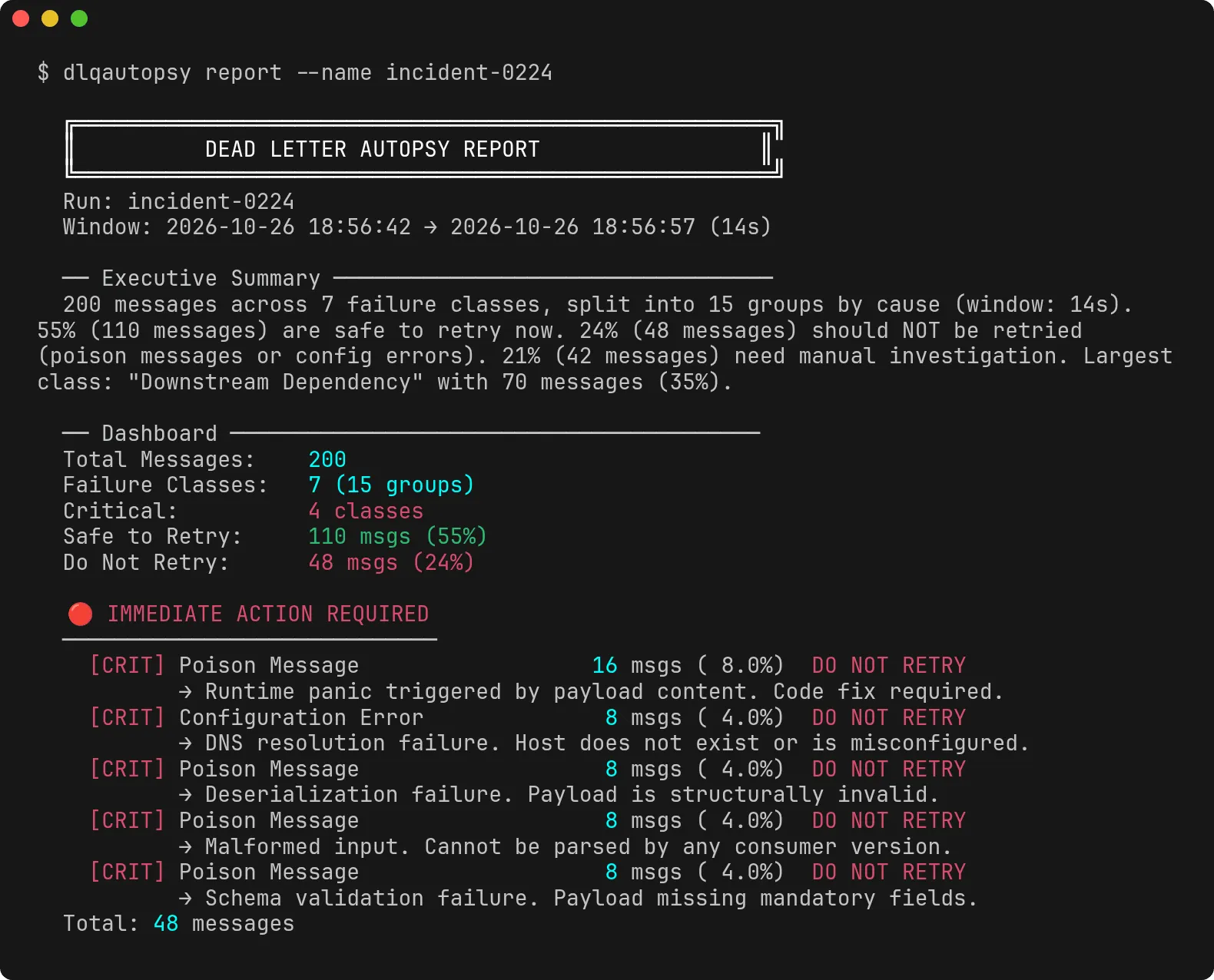
$ dlqautopsy report --name incident-0224

  ╔══════════════════════════════════════════════════════╗
  ║          DEAD LETTER AUTOPSY REPORT                 ║
  ╚══════════════════════════════════════════════════════╝
  Run: incident-0224
  Window: 2026-10-26 18:56:42 → 2026-10-26 18:56:57 (14s)

  ── Executive Summary ──────────────────────────────────
  200 messages across 7 failure classes, split into 15 groups by cause (window: 14s). 55% (110 messages) are safe to retry now. 24% (48 messages) should NOT be retried (poison messages or config errors). 21% (42 messages) need manual investigation. Largest class: "Downstream Dependency" with 70 messages (35%).

  ── Dashboard ─────────────────────────────────────────
  Total Messages:    200
  Failure Classes:   7 (15 groups)
  Critical:          4 classes
  Safe to Retry:     110 msgs (55%)
  Do Not Retry:      48 msgs (24%)
In a terminal the report is coloured. This is the top of the same report, rendered from the recorded terminal output of the run, including the first triage bucket:
The rest of the report lists the groups by triage bucket (immediate action, safe to retry, needs investigation), and then each group in detail with its time window, receive counts, a sample error and the payload shapes it saw. One group from the detailed part, without its payload shapes:
  [7] Transient Error  [WARNING] [RETRY WITH BACKOFF]
      Count:          12 messages (6.0% of total)
      Signatures:     2 unique error hashes
      Timeline:       2026-10-26 18:56:42 → 2026-10-26 18:56:57 (14s)
      Retry Pattern:  Exhaustion (avg 4.0 receives, max 4)
      Spread:         12 messages sent and ingested within 14s (earliest SentTimestamp to latest ingestion)
      Action:         Database deadlock or lock contention. Safe to retry with backoff.
      Sample Error:   Error 1205 (HY000): Lock wait timeout exceeded; try restarting transaction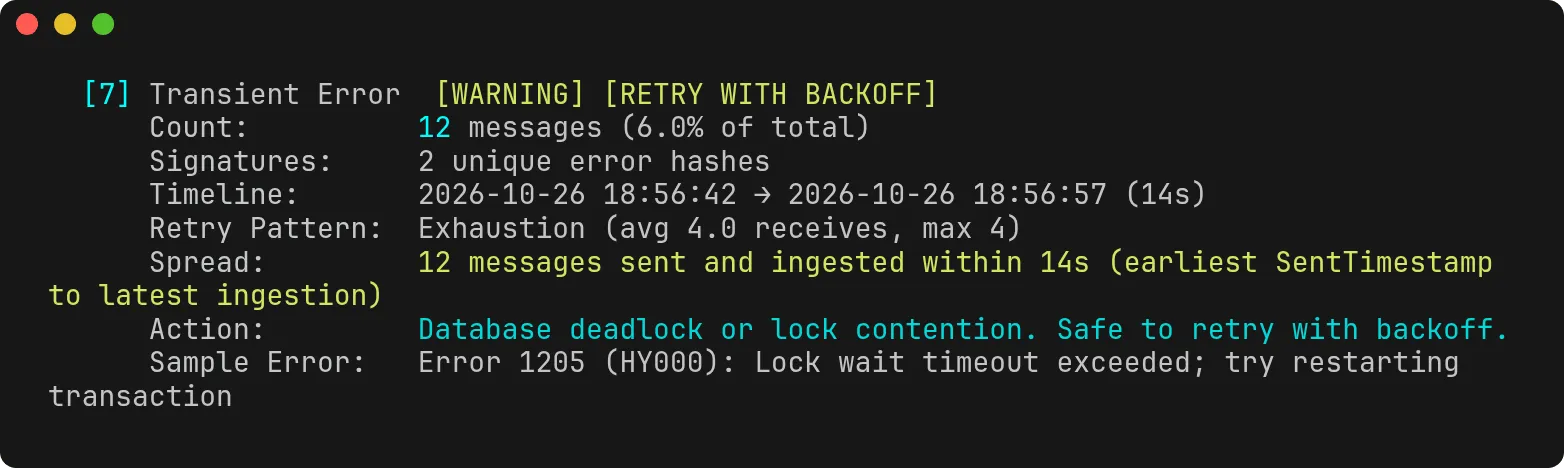
The Spread line only says what the timestamps show. Version 0.1.0 had a Burst line here that said things like “Likely a single event”, which read more into a 14 second window than it could know. The same data is available with --format json and --format markdown.
The 55% “safe to retry” is the one number I would read carefully. It includes the groups marked “retry with backoff”, so it means “a retry might work”, not “send it all back right now”.
Looking at single messages
detail shows the messages behind a class or an error signature. This is detail --name incident-0224 --signature 6fda388f --limit 1, one of the poison messages, with a Go panic stored in the message body:
  [1] Message ID: db65dbef-7452-4ce0-8039-03587cbb99a2
      Receives:    4
      First Seen:  2026-10-26 18:56:42
      Last Seen:   2026-10-26 18:56:57
      Signature:   6fda388f6009e852
      Severity:    critical
      Verdict:     DO NOT RETRY
      Shape:       error,handler,payload.batchId,payload.items,payload.requestedBy,payload.warehouseId,service,timestamp,traceId
      Error:       runtime error: index out of range [0] with length 0
                   	goroutine 18 [running]:
                   main.(*StockHandler).BulkUpdate([ADDR], {[ADDR], [ADDR], [ADDR]})
                   	/app/handler/stock.go:[LINE] +[ADDR]
      Body:        {"service":"inventory-service","handler":"BulkUpdateStock","traceId":"e5f6a7b8-c9d0-1234-efab-345678901234","error":"runtime error: index out of range [0] with length 0\n\tgoroutine 18 [running]:\nmain.(*StockHandler).BulkUpdate(0xc000198000, {0x0, 0x0, 0x0})\n\t/app/handler/stock.go:134 +0x2b8",...
The Error line is the normalized version. The goroutine address and the line number are replaced, so the same panic from other messages ends up with the same signature, while the Body line still shows the original.
Comparing two runs
A single snapshot only tells you so much. What I also want to know after a fix is whether the dead letter queue looks different the next time I check it. To test that, I sent a second batch of 50 messages straight to the DLQ with a small Python script: 30 HTTP 403 errors, 12 deserialization errors, 5 lock wait timeouts and 3 messages saying invoice 14030 is already closed, which no rule knows about. Then I inspected it as a second run:
$ dlqautopsy classify --name incident-0224-later
Normalizing 50 raw events...
Normalization complete. 50 records inserted.
Classifying 50 records...
Classification complete. 50 records updated.

  Classification Complete — 'incident-0224-later'
  ────────────────────────────────────────────────────────
  [CRIT] Auth Failure                    30 msgs (60.0%)  NEEDS INVESTIGATION
         → Authentication or authorization failure. Check credentials and perm...
  [CRIT] Poison Message                  12 msgs (24.0%)  DO NOT RETRY
         → Deserialization failure. Payload is structurally invalid.
  [WARN] Transient Error                  5 msgs (10.0%)  RETRY WITH BACKOFF
         → Database deadlock or lock contention. Safe to retry with backoff.
  [WARN] Unknown-64eb2e51                 3 msgs ( 6.0%)  NEEDS INVESTIGATION
         → No matching rule. Manual investigation required.
  ────────────────────────────────────────────────────────
  Total: 50 messages classified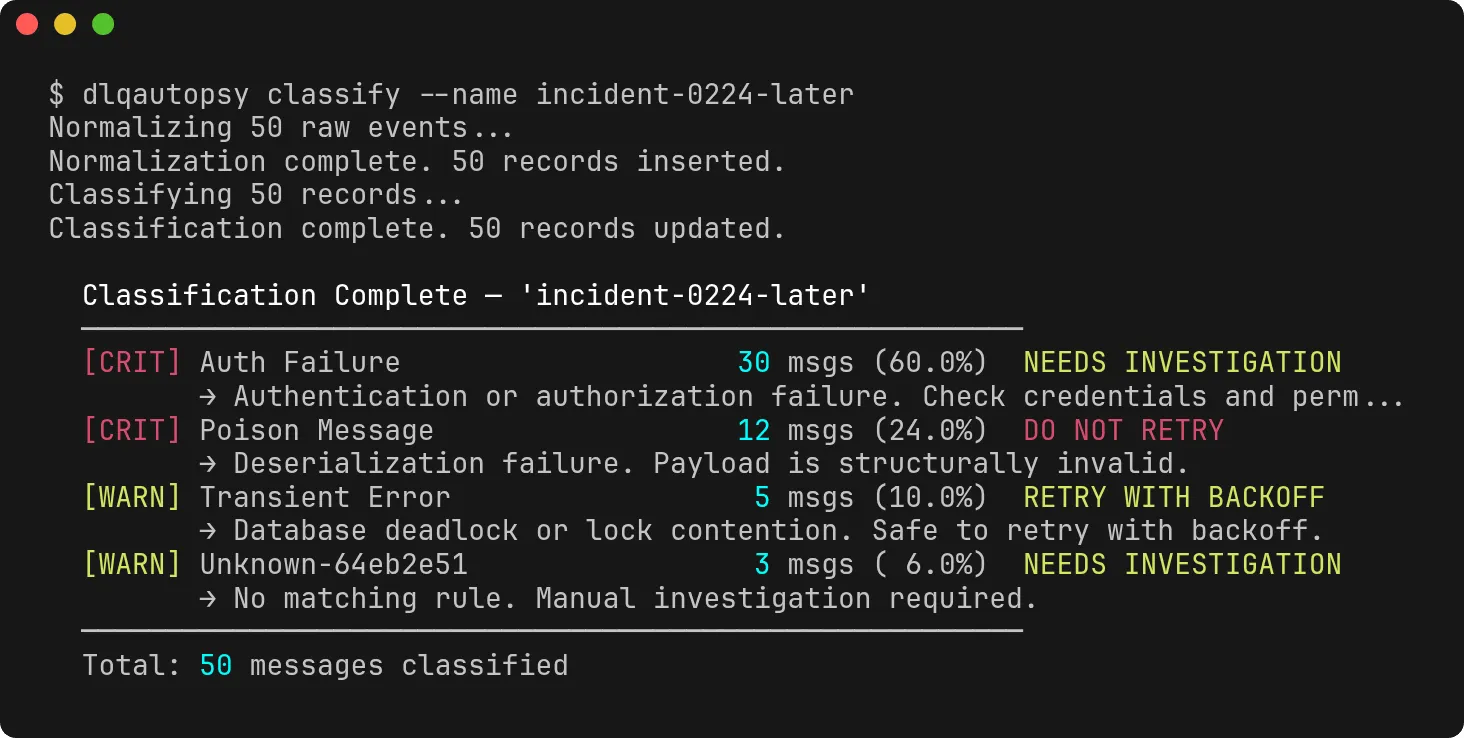
The last row is the one I added the invoice messages for. 14030 contains 403, and an earlier version of the classifier matched short keywords and status codes as plain substrings, so this would have been filed as an Auth Failure. Status codes now only match when they aren’t part of a longer number. Since v0.1.1 the normalizer also turns 14030 into [NUM] before the rules run, so the error the classifier sees is invoice [NUM] is already closed, and invoice messages with different numbers share one signature.
diff compares the two runs by class:
$ dlqautopsy diff --name incident-0224 --compare incident-0224-later

  ╔══════════════════════════════════════════════════════╗
  ║              RUN COMPARISON                         ║
  ╚══════════════════════════════════════════════════════╝
  Base:    incident-0224
  Compare: incident-0224-later

  🆕 NEW FAILURE CLASSES (appeared in incident-0224-later)
  ──────────────────────────────────────────
    + Unknown-64eb2e51                 3 msgs [WARNING]

  ✅ RESOLVED (gone from incident-0224-later)
  ──────────────────────────────────────────
    ✓ Downstream Dependency        was 70 msgs
    ✓ Configuration Error          was 16 msgs
    ✓ Network Error                was 16 msgs
    ✓ Resource Exhaustion          was 14 msgs

  📈 WORSENING
  ──────────────────────────────────────────
    ▲ Auth Failure                 20 → 30 (+10, +50%)

  📉 IMPROVING
  ──────────────────────────────────────────
    ▼ Poison Message               40 → 12 (-28, -70%)
    ▼ Transient Error              24 → 5 (-19, -79%)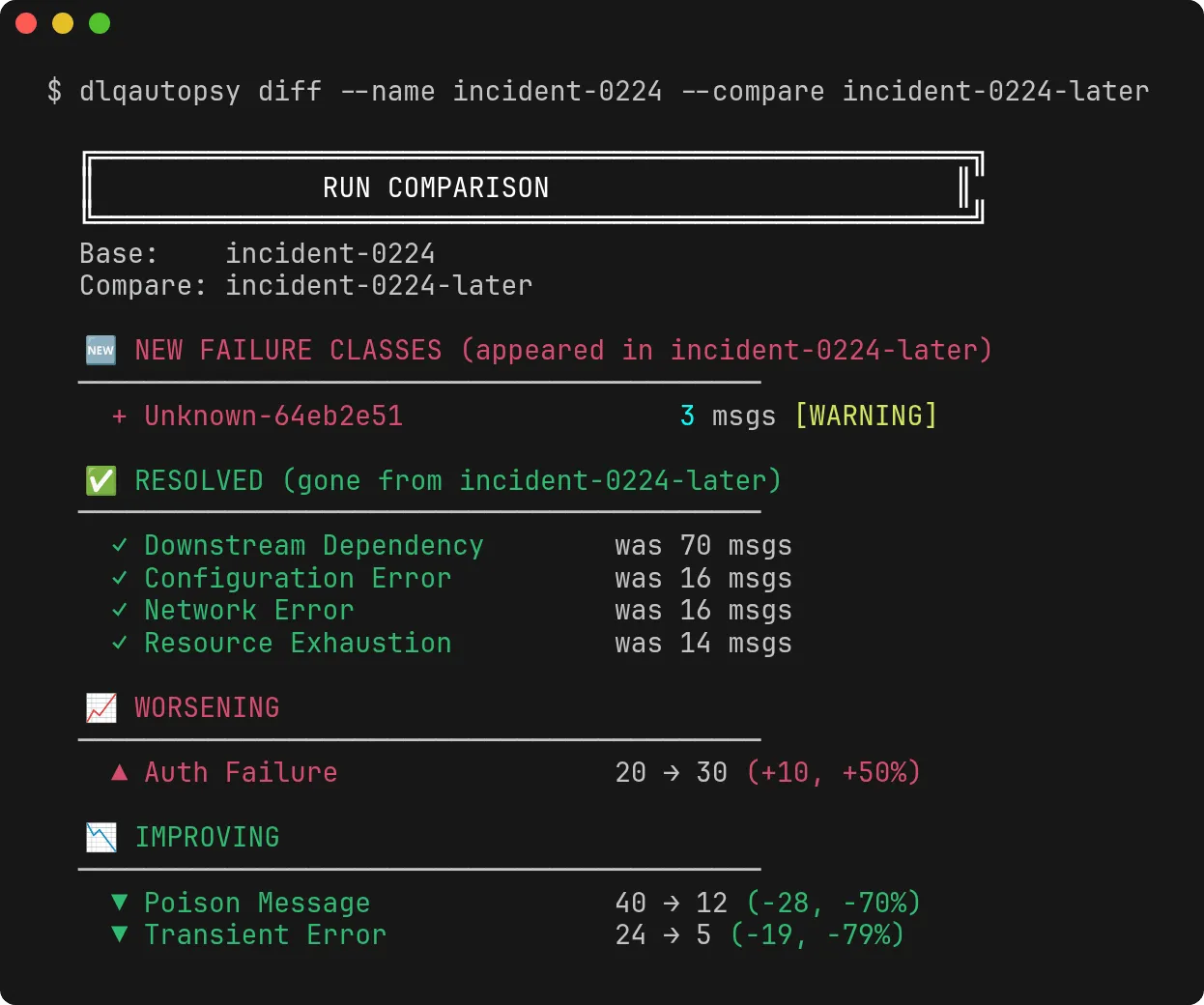
There is also a JSON version (--format json) with the same sections, which is easier to feed into something else.
Limitations
This is a small tool, and some of its edges are visible in the output above. Version 0.1.1 addressed four of the points I listed when I first published this post. What is left:
- Only SQS is supported, and I have only run it against standard queues. RabbitMQ and Kafka collectors are on the roadmap, not implemented yet.
- It reads the error from the message body. If your consumer puts the error somewhere else, or doesn’t record it in the message at all, dlqautopsy has nothing to classify and you get
Unknown-…classes. - The rules are keyword lists. Short keywords and status codes match on boundaries, longer keywords are still plain substrings, so an unusual error text can land in the wrong class.
- Only runs of five or more digits are replaced with
[NUM]. A four-digit ID still gives every message its own signature, and a five-digit port number becomes[NUM]too, so errors that differ only in the port share a signature. - The end of a time window is the moment the message was ingested, not the moment it failed. SQS doesn’t give you the latter. That is why every window above is 14 seconds: the seed and the ingestion took that long. Since v0.1.1 the report says which timestamps it used instead of guessing at a cause, but it still can’t tell you when your consumer failed.
- “Busiest Hour” counts the messages of a group in the busiest UTC clock hour by
SentTimestamp. It is shown only when a group spans more than one clock hour, so it doesn’t appear in this test. In v0.1.0 the same number was called “Peak Rate”, and in JSONpeak_hourly_spikeis nowbusiest_hour_count. inspectis a snapshot. With--empty-receivesit waits longer before it stops, but messages that arrive after it stops are not in the run.- Receiving messages changes them. Without
--purge, everyinspectincreases the receive count, and messages are invisible for the DLQ’s visibility timeout while it runs. - It does not redrive, replay or edit messages, and it doesn’t send alerts.
The code, the seed script and the docs are on GitHub: github.com/doganaydindev/dlqautopsy.